Copying Scalar Values
If required, you can copy the scalar values from a multi-ROI to another multi-ROI. In this case, the number of classes in both multi-ROIs must be the same.
How to Copy Scalar Values
- In the Data Properties and Settings panel, right-click the multi-ROI that you want to copy the scalar values to.
- Choose Copy Scalar Values From in the pop-up menu.
The Choose a Scalar Values Slot dialog appears.
- Choose the multi-ROI that contains the scalar values you want to copy in the Object drop-down menu.
- Choose the scalar values you want to copy in the Slot drop-down menu.
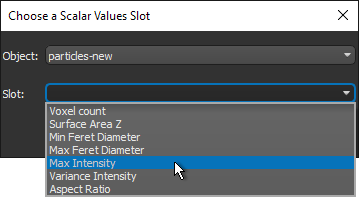
- Click OK to copy the slot to the selected multi-ROI.
- Copy additional scalar values, as required.
- Save your changes, if required (see Exporting Objects).
